Router Light Diagnostic
Select a light below to see what it means and recommended actions.
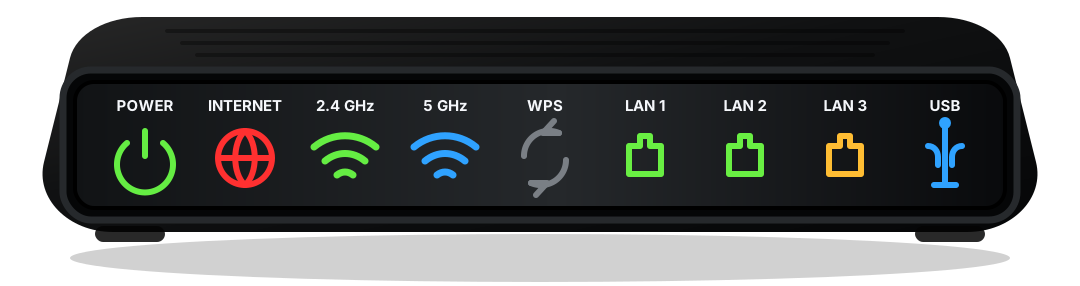
What it means
The router cannot establish a connection to your Internet service.
- Check that the modem is powered on and online.
- Ensure the Internet cable is secure on both ends.
- Restart your modem, then wait 2-3 minutes.
- If it persists, contact your Internet Service Provider.
| LED Reference by Color / State | Power(PWR) | Internet(WAN) | 2.4 GHz(Wi-Fi) | 5 GHz(Wi-Fi) | WPS(Wi-Fi Protected Setup) | LAN(1-4) | USB(USB) |
|---|---|---|---|---|---|---|---|
| Solid Green | Device is on | Connected | Wi-Fi on | Wi-Fi on | Ready | Connected | Connected |
| Blinking Green | Blinking up | Connecting | Data traffic | Data traffic | Pairing | Data traffic | Data transfer |
| Solid Amber | - | Limited connectivity | Weak signal | Weak signal | Overlap detected | Slow link (100 Mbps) | Slow device |
| Blinking Amber | Firmware update | Authenticating | WPS in progress | WPS in progress | Timeout | Activity / Negotiating | Activity |
| Solid Red | Power fault | No connection | Wi-Fi error | Wi-Fi error | Failed | Link error | Device error |
| Blinking Red | Hardware error | Connection error | Overlapping channel | Overlapping channel | Error | Collision / Error | Overcurrent |
| Off | No power | No link detected | Wi-Fi off | Wi-Fi off | Not active | No device | No device |